Small Business Cyber Security (UK): Do These 7 Things Today
Small Business Cyber Security (UK)
Introduction
Bold move time. The keyword is this: cyber security for small business.
Most hacks aren’t “advanced.”
They’re basic.
Weak passwords.
No MFA.
Old software.
You don’t need a SOC (Security Operations Center).
You need a checklist you’ll actually do.
I’ll show you the exact steps.
In plain English.
UK-specific.
Backed by what stops 90% of incidents.
Keep reading or keep guessing.
Your call.
A Beginner’s Guide to VPNs for Businesses
Secure your data and enable safe remote work.
Mastering Microsoft 365 for Small Businesses
Unlock automation and team productivity today.
Cybersecurity for Small Business Owners
Understand the risks and implement protection.
Why UK SMEs get hit more than they think
Attackers target the easy wins.
Small teams.
Shared logins.
Old laptops.
One person holding everything together.
Remote work increases the attack surface.
Staff get phished because nobody trained them.
Basic controls block most of this.
You’re going to implement them today.
Internal link:
common mistakes
The 5 controls that matter for SMEs (maps to Cyber Essentials)
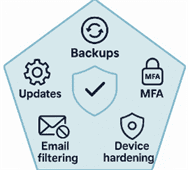
These align to what UK buyers expect.
They’re practical.
They’re cheap or free.
They work.
1) Backups that actually restore
Follow 3-2-1.
Three copies.
Two different media.
One off-site or immutable.
Automate daily.
Test a restore every month.
Document where backups live and who can access them.
2) Security update management
Turn on automatic updates for Windows, macOS, browsers, and apps.
Patch monthly.
Emergency-patch critical issues.
Remove software you don’t use.
Outdated plugins and firmware are easy entry points.
Internal link :
Windows security
3) Multi-factor authentication everywhere
Start with admins and email.
Then banking.
Then anything remote.
Use an authenticator app or hardware keys.
Avoid SMS if you can.
Store recovery codes in a safe place.
Internal links :
MFA guide
Microsoft 365 tips
4) Device hardening and secure configuration
Remove local admin from day-to-day accounts.
Turn on BitLocker or FileVault.
Disable Office macros by default.
Harden browsers.
Set screen locks and idle timeouts.
Enforce strong passwords and consider passkeys.
Internal link :
performance and security
5) Malware protection and email filtering
Use business-grade endpoint protection.
Enable phishing and attachment filtering in email.
Block legacy protocols like POP/IMAP where possible.
Quarantine suspicious mail.
Review alerts weekly.
Internal links :
what is a VPN
VPN setup on Windows
Want the full roadmap? Grab my eBook → [Cybersecurity for Small Business Owners](Amazon link).
Phishing training that people actually remember
Staff don’t need a lecture.
They need a drill.
Run a five-minute routine every month.
The drill: Identify → Verify → Report → Delete → Review.
Show real UK examples.
Make reporting one click in Outlook or Teams.
Track the click-rate trend.
Share lessons in one slide.
Internal links :
Teams tips
foundation guide
Secure Microsoft 365 in 30 minutes
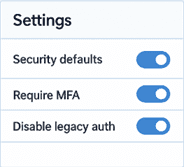
Turn on Security Defaults or a basic Conditional Access policy.
Force MFA for everyone.
Disable legacy authentication.
Move Desktop/Documents/Pictures to OneDrive Known Folder Move.
Enable versioning and retention.
Apply baseline Defender policies.
Internal links:
M365 tips
MFA guide
Remote access without weak links
Kill exposed RDP on the internet.
Use a business VPN or a zero-trust option.
Require MFA for any remote path.
Lock down admin access.
Monitor sign-ins and device health.
Internal links :
VPN basics
Streaming & VPNs
VPN reviews
Your 60-minute setup plan (do this today)
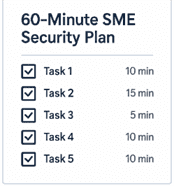
10 mins: Turn on MFA for email and all admins.
10 mins: Enable automatic updates and schedule a weekly reboot window.
15 mins: Confirm OneDrive/SharePoint backups and run a test restore.
10 mins: Remove local admin on laptops and enable BitLocker.
10 mins: Add a “Report Phish” button and brief the team.
5 mins: Save a one-page incident contact list.
Internal link :
SME security guide owners/
Templates, checklists, and next steps
Create a one-page SME cyber checklist.
Map it to Cyber Essentials.
Add a staff policy starter.
Set a quarterly review cadence.
Track three metrics: MFA coverage, patch compliance, phishing click rate.
Improve them every quarter.
FAQs: cyber security for small business (UK)
What is the minimum cyber security for small business in the UK?
Backups.
Updates.
MFA.
Device hardening.
Phishing training.
These map to Cyber Essentials and block most issues.
Do small businesses need Cyber Essentials?
Strongly recommended.
Often required for UK tenders and supply chains.
It proves you’ve covered the basics.
How much should a small business spend on cyber security?
Start with what you already own.
Microsoft 365 and Windows include most controls.
Budget for training, backups, and a few hours each quarter.
Is antivirus enough for SMEs?
No.
AV is one layer.
You need MFA, patching, backups, email filtering, and basic hardening.
What’s the best first step today?
Turn on MFA for email and admin accounts.
Then patch and reboot.
Then test a restore.
Closing
Do the basics now.
Do them again next quarter.
That’s how you win.
That’s how cyber security for small business actually works.
✅ This guide covers the essentials, but if you’d like a complete step-by-step plan with real-world examples, checklists, and best practices, you’ll find it in my eBook:
👉 Cybersecurity for Small Business Owners available now on Amazon.